Guide
WORX Landroid Problems & Reliability: What Owners Report (2026)
WORX Landroid problems owners report in 2026: E1 'no signal' boundary-wire breaks, getting stuck, rain-sensor false triggers, Wi-Fi drops, and the fixes.
Find Matching ModelsBy MowScout EditorialUpdated 2026-07-01How we scoreHow we test
WORX Landroid problems and reliability: what owners report (2026)
The most-reported WORX Landroid problems are boundary-wire faults — the E1 "wire missing / outside boundary" error when the buried loop breaks — plus getting stuck or drifting on slick grass (traction), a rain sensor that false-triggers in humidity, an app that drops offline, and cut quality that suffers if you let the lawn get tall or oversize the machine. Almost all of them are the predictable trade-offs of a budget, boundary-wire robot, and most have a known owner fix. The honest reliability verdict: the wire-based Landroid M is an affordable, genuinely modular mower for small, flat, wire-friendly yards — but the buried wire and the budget build are the compromises you accept, and WORX's own newer Landroid Vision is the wire-free direction the category is moving.
A quick, honest note on sourcing: MowScout is spec-verified and data-driven, not a hands-on test lab. We have not run a Landroid on our own lawn. Every problem below is attributed to the owners, reviewers, and WORX's own support documentation (including the error-code pages on wiki.worx.com) that reported it — all cited at the end. Where we say "owners report" or "per WORX's wiki," that is exactly what we mean; we are not passing anyone else's fault off as our own testing. For the wider category, start at the pillar: robot lawn mowers.
<em>Disclosure: MowScout may earn a commission from links on this page. It never changes our verdicts — we cite our sources and name the trade-offs.</em>
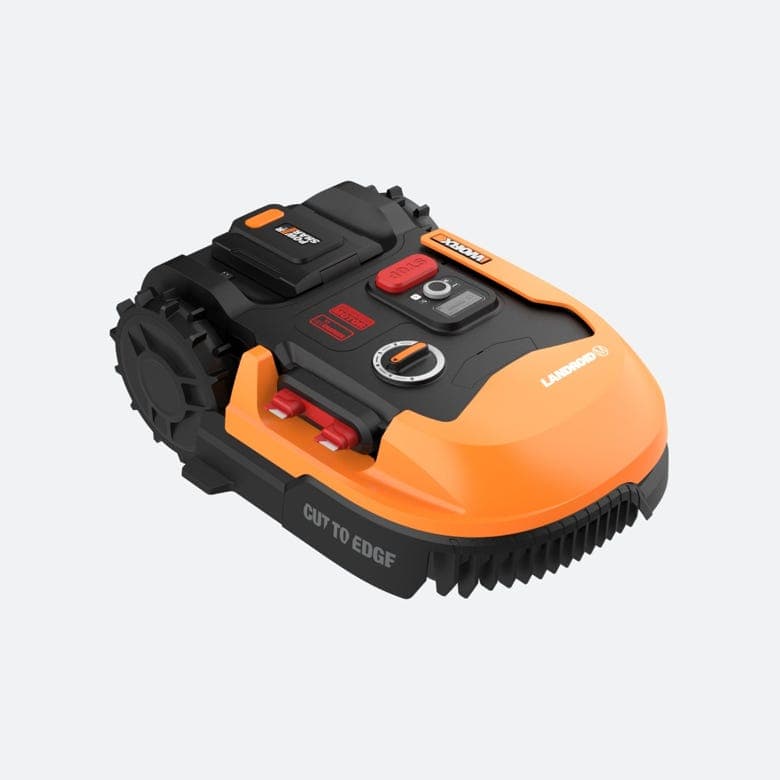
Image: WORX official product photography. MowScout does not shoot original hardware photos; this is the manufacturer's image, used to illustrate the product.
Quick answer: how reliable is the WORX Landroid, really?
The wire-based WORX Landroid is a budget-tier machine judged by budget-tier expectations, and on those terms owners and reviewers generally find it does the core job: it quietly keeps a small, flat lawn cut without much fuss once it's dialed in. It is not, however, the set-and-forget benchmark that premium wire mowers are — the complaints are more frequent and the build is lighter. In our data the WORX Landroid M WR147 earns a MowScout Score of 58: a reasonable value under $1,000 (around $699 street), marked down for basic obstacle handling, a modest 0.25-acre rating, no built-in GPS tracking, and a buried boundary wire in an era when wire-free rivals exist.
The reliability story clusters into a handful of recurring themes: boundary-wire "no signal" (E1) faults, traction/drift and getting stuck, rain-sensor false triggers, app and Wi-Fi drop-offs, cut quality when grass gets tall, and the add-on modules that are both the Landroid's party trick and an extra thing to break. Read those as the friction you should walk in expecting on a budget wire mower — not as evidence of a lemon. The sections below break down each one with the owner report and the known fix.
The most-reported Landroid problems at a glance
Here's the pattern across WORX's support wiki and owner reviews, with the first thing to try for each. The deep sections that follow explain each in detail.
| Problem | What owners report | First fix |
|---|---|---|
| E1 wire missing / no signal | Won't leave dock; base LED not solid green | Check base power/connectors, then find and splice the wire break |
| Traction / drift | "Wheels slip on flat dry grass," wanders past the wire | Grippier wheels (WA0955/WA0952), add weight, mow when drier |
| Getting stuck (E4) | Trapped in narrow spots, on roots, in tall grass | Widen tight channels in the wire; clean disc/wheels |
| Rain sensor | "Stuck on raining mode," false triggers in humidity | Clean sensor, shorten or disable rain delay |
| App / Wi-Fi offline | "Seems to be offline" one meter from router | Force 2.4 GHz only; B/G Wi-Fi mode; re-pair |
| Cut quality on tall grass | Struggles / blade fault (E3) after overgrowth | Mow more often; replace all blades together |
None of these is a catastrophic-defect signature — they're the maintenance profile of a wired, contact-sensing budget robot. For the exact on-screen wording and codes across brands, cross-reference our robot mower error codes guide.
WORX Landroid error codes E1–E8 (the headline reference)
The wire-based Landroid Classic mowers — the WR14x / WR147 family — use a compact E1 through E8 error scheme. These are the codes you'll actually see on the display and in the app, and knowing them is the fastest way to triage a problem. The definitions below are quoted from WORX's own documentation (wiki.worx.com and the WR141E owner's manual); the meanings are the manufacturer's, not our testing.
| Code | WORX meaning | What it usually is |
|---|---|---|
| E1 | "Boundary wire missing OR Landroid outside boundary wire" | Wire break, loose base connector, dead power supply, or mower outside the loop |
| E2 | "Motor wheels fault" | Something blocking a drive wheel; debris in the wheel/motor |
| E3 | "Motor blade fault" | Blade disc jammed by a stick, tall grass, or debris |
| E4 | "Error trapped" | Physically stuck / can't maneuver out of a tight spot |
| E5 | "Error lifted" | Lift sensor triggered; mower picked up or riding over an object |
| E6 | "Error upside down (tilted)" | Tilt beyond limit; often a steep dip or the mower flipped |
| E7 | "Battery charge error" | Overheating, cold, poor dock contact, or power-supply failure |
| E8 | "Error find home timeout" | Couldn't reach the base in time; base misplaced or loop too long |
A few things worth flagging. E1 is the big one — it's the WORX version of a "no loop signal" fault and by far the most-reported code, covered in its own section below. WORX's manual also notes the perimeter wire should be kept under roughly 350 meters; exceed that and E8 "find home timeout" becomes more likely because the mower runs down before it can follow the wire home. One important caveat: WORX's newer wire-free Landroid Vision uses a completely different error/status scheme (documented separately on wiki.worx.com), so if you're reading Vision error messages, the E1–E8 table above does not apply. We track the wire-based WR147 here, so these are the codes that matter for it.
The headline problem: boundary-wire breaks and E1 "no signal"
If you read one section, read this one. On any wire-guided robot mower, the buried boundary loop is simultaneously what makes navigation reliable and the single most common thing that fails — and the Landroid is no exception. E1 ("Boundary wire missing OR Landroid outside boundary wire") means the mower can't read the perimeter signal. Per WORX and owner troubleshooting reports, the usual causes are a broken boundary wire, a loose or corroded connector at the charging base, a failing power supply, or the mower physically sitting outside the loop.
Owners describe E1 as the most aggravating Landroid fault precisely because the wire is invisible and shallow — an aerator, an edging spade, a rodent, or frost heave can nick it anywhere along a loop that may run hundreds of feet. One reviewer described "erratic movement patterns, with the mower behaving as though it detects the boundary wire in the middle of the lawn, turning and pivoting despite being far from the actual perimeter" — the classic signature of a compromised loop or a base-signal problem.
How WORX and owners say to find and fix it:
- Read the base LED. A solid green light means the loop is intact; a flashing or red LED signals a break. This one indicator rules a lot in or out immediately.
- Check the easy causes. Confirm the boundary-wire connectors are fully seated at the base, the base has power, and — a frequently overlooked culprit — the power supply is healthy. Owners report cases where the supply "does still supply enough power for the wire, but not enough to charge the mower," and vice versa.
- Trace the break. A widely shared owner trick is to use an AM radio tuned near 700 kHz, walking the wire and listening for the interference to drop out at the break point.
- Splice it right. Repair damaged sections with waterproof boundary-wire connectors, not household wire nuts — a poor splice is what causes E1 to keep coming back.
This is exactly the maintenance chore that wire-free mowers eliminate — there's no loop to break on a camera- or RTK-guided machine. If chasing a buried wire sounds like a dealbreaker, that's a legitimate reason to weigh the wire-free options in our buyer's guide.
Getting stuck, traction, and narrow passages (E4)
Like every robot mower, the Landroid can physically bog down and message you to come rescue it — that's E4 "trapped." But the Landroid has a specific, well-reported wrinkle that goes beyond ordinary snags: traction. One dissatisfied owner reported that the "wheels slip and lose traction on flat dry grass," and that this "causes the mower to wiggle its way outside of the boundary wire frequently." So on the Landroid, poor grip doesn't just stall it — it can push it across the boundary and trigger E1 as a knock-on effect.
Compounding this, the WR147's obstacle handling is basic in our data — it's collision-and-lift based, not camera vision, so it bumps into things rather than seeing them (the optional ACS module, covered below, is WORX's ultrasonic add-on to help with this). Narrow channels, roots, tight islands, and tall grass are the usual physical traps.
Fixes owners and WORX recommend:
- Upgrade the wheels. WORX sells Tough Terrain (WA0955) and Muddy Terrain (WA0952) wheels for grip; owners also report adding self-tapping screws to the stock wheels or a small weight (~900 g) over the rear axle for downforce.
- Mow when it's drier. Slick, wet, or dewy grass is when the drift-and-slip problem is worst.
- Widen tight spots in the wire. If it gets trapped in the same corner every time, re-route the loop to give more turning room.
- Keep it clean. Clear grass buildup from the blade disc and check the drive wheels for debris — a clogged disc or caked wheel is a frequent stall cause.
For a step-by-step on chronic stalls across brands, see the getting-stuck guide.
Rain sensor and scheduling frustrations
The Landroid ships with a rain sensor that returns it to the dock when it detects moisture — sensible in theory, a scheduling headache in practice. Owners report the mower getting "stuck on raining mode" in high humidity or heavy morning dew and refusing to mow in plainly dry conditions, with one blunt complaint that "the sensor itself is useless at detecting rain." Because the Landroid runs on a schedule, a false rain-trigger at dawn can eat the whole session.
Reported fixes, in order of effort:
- Clean the sensor of grass clippings and debris that hold moisture and cause false reads.
- Shorten the rain-delay timer in settings — the default delay is roughly 180 minutes, and owners dial it down so a brief false trigger doesn't kill a whole mow.
- Disable the delay entirely by setting it to 00:00 on the LCD, which many owners do. Our data lists the WR147 as rated to handle wet grass, so cutting slightly damp turf isn't the risk it is on some rivals — but understand you're then relying on the schedule alone.
None of this is a hardware defect so much as an over-sensitive convenience feature you'll want to tune in your first week.
App and Wi-Fi connectivity
The Landroid app is where a lot of everyday frustration lives. Owners report the app showing "Landroid seems to be offline" even with the mower "one meter from the router," plus intermittent disconnects and pairing trouble. Our data rates the WR147's app experience a modest 3 out of 5 — functional, not polished.
The root cause is usually Wi-Fi band and mode, not a broken radio. Reported fixes:
- Force 2.4 GHz. The Landroid connects on 2.4 GHz only — a 5 GHz or mixed band is a common failure. On mesh systems, owners create a dedicated 2.4 GHz-only network (sometimes on a cheap secondary router) for the mower.
- Set the router to B/G mode rather than a mixed A/C mode, which several owners credit with fixing chronic drop-offs.
- Re-pair via the web account. Some owners bypass flaky app pairing by configuring through their worxlandroid.com account.
- Watch for smart-home conflicts. Third-party integrations (Home Assistant plugins and similar) have been reported to interfere with the connection.
If reliable app control and scheduling matter to you, budget some setup time — and know that the connectivity quirks are almost always solvable network-side.
Cut quality on tall grass and blade faults (E3)
The Landroid uses small pivoting razor blades and an 8-inch cutting width, which is efficient for frequent, little-and-often mowing but poor at reclaiming an overgrown lawn. Owners report that after a stretch of inactivity the mower "struggles more than usual," and letting grass get tall can trigger the E3 blade-motor fault as the disc jams. This is a design expectation, not a defect: robot mowers in general — and small budget ones especially — are groomers, not brush cutters.
How owners keep cut quality up:
- Mow often, cut little. Never take off more than about a third of the blade height in a session; frequent short cuts keep the lawn in the Landroid's comfort zone.
- Start high, lower gradually. Set cutting height near maximum at first and reduce over a few weeks.
- Replace all blades together. Swap the full set at once (never mix old and new) and use the new screws in the kit — mismatched blades throw the disc off balance.
- Rotate blades monthly to extend life.
Manage grass length and the Landroid cuts cleanly for the class; neglect it and you'll meet E3.
Add-on modules: ACS, Off Limits, and Find My Landroid
WORX's signature pitch is modularity — the Landroid is a base robot you extend with plug-in accessories. That's a genuine value strength, but each module is also one more thing that can misbehave, and owners report exactly that.
- ACS (Anti-Collision System, WA0860). An ultrasonic sensor module that lets the Landroid detect obstacles roughly 5 inches high and begin reacting within about 8 inches, instead of bumping them. Useful, but with an inherent limit WORX itself notes: because the mower follows the boundary wire to and from the dock, ACS "can't help it work around an obstacle and reacquire the wire" — so fixed objects near the wire still need to be fenced with the loop.
- Off Limits (wireless no-go). Magnetic strips that create no-go zones without cutting the boundary wire. Owners report firmware fragility here: one detailed review described a firmware update after which "the mower no longer recognizes the Off Limits" strips, forcing a rollback. Treat module behavior as firmware-dependent.
- Find My Landroid (GPS/cellular). Our data lists the WR147 with anti-theft (a PIN lock) but no built-in GPS tracking — GPS is an optional cellular add-on module, usually with a subscription. If theft is a real concern, factor that extra cost in, or look at a mower with GPS built in like the Husqvarna Automower 430X.
The honest read: modularity keeps the entry price low and lets you buy only what you need, but "buy the capability separately" also means the capability is only as solid as that module's firmware.
Don't oversize it: the small-yard caveat
A lot of "the Landroid can't keep up" complaints are really spec mismatches. The Landroid M WR147 is rated for about 0.25 acre (roughly 10,000–11,000 sq ft) of relatively flat lawn, up to about a 30% slope, with that narrow 8-inch deck. Push a budget Landroid well past its rated area and it will show as patchy or long grass — not because it's broken, but because it's out of coverage. WORX also caps the perimeter wire around 350 m, another sign of where this machine is meant to live.
Buy it for the yard it's rated for and it's a fair value; oversize it and you'll be disappointed by a machine that was never specced for the job. Match your real lawn size, slope, and obstacles in the configurator before you buy, and compare budget alternatives in our best robot mower under $1,000 guide.
Who should buy a WORX Landroid — and who should look elsewhere
Buy the wired WORX Landroid (WR147) if:
- You have a small, mostly flat lawn (around a quarter acre) that's friendly to a buried wire, and you want autonomous mowing under $1,000.
- You value modularity and a low entry price — buying add-ons (ACS, Off Limits, GPS) only if and when you need them.
- You're comfortable installing and occasionally repairing a boundary wire, and tuning the app/rain settings in the first week.
- You'll commit to frequent little-and-often mowing and basic blade maintenance.
Look elsewhere if:
- You don't want to trench or maintain a boundary loop at all — the entire E1 "no signal" failure mode disappears with a wire-free mower. If that's your dealbreaker, consider WORX's own newer wire-free Landroid Vision (a different, pricier camera-guided product) or another wire-free brand.
- Your lawn is larger than ~0.25 acre, steeper than ~30%, or obstacle-heavy — the WR147 will be out of its depth; see the buyer's guide for right-sizing.
- You want built-in GPS anti-theft and camera obstacle avoidance rather than contact bumping and an add-on tracker — that's where step-up models like the Husqvarna Automower 430X pull ahead.
Honest bottom line: the wire-based Landroid isn't fragile for its price, and it isn't a lemon — it's an affordable, modular robot whose problems are overwhelmingly wire problems and budget-build trade-offs. The buried loop that occasionally throws E1, the wheels that slip on wet grass, the twitchy rain sensor, and the 2.4 GHz-only app are all known, mostly fixable quirks. Match it to a small flat yard and set expectations at its price, and it earns its place under $1,000. Decide the wire and the budget compromises aren't for you, and that's exactly the itch the wire-free generation — WORX's Landroid Vision included — was built to scratch.
FAQ
Is the WORX Landroid reliable? For what it is — a budget, boundary-wire mower for small flat yards — it's reasonably reliable, but it's not in the same reliability tier as premium wire mowers. Owners and reviewers report solid autonomous mowing when it's installed and maintained well, alongside recurring friction: boundary-wire "no signal" (E1) faults, wheels that slip and drift outside the wire on dry grass, an app that drops offline, and a rain sensor that false-triggers in humidity. Our data scores the wired Landroid M WR147 a 58 — a fair budget pick under $1,000, marked down for basic obstacle handling, a small 0.25-acre rating, and the buried wire that newer wire-free mowers (including WORX's own Landroid Vision) are built to avoid.
What does error E1 mean on a WORX Landroid and how do I fix it? On the wire-based Landroid Classic mowers, E1 is the boundary-signal error — WORX's wiki lists it as "Boundary wire missing OR Landroid outside boundary wire." It's the WORX equivalent of a "no loop signal" fault: the mower can't read the perimeter wire, almost always because of a wire break, a loose connector at the base, a dead power supply, or the mower physically sitting outside the loop. Per WORX and owner reports, check that the charging base LED is solid green (a break shows a flashing/red LED), confirm the wire connectors are seated, verify the power supply is actually powering the loop, then locate the break and splice it with a waterproof connector. Owners report using an AM radio near 700 kHz to trace the wire and find the break.
Why does my WORX Landroid keep getting stuck or drifting outside the wire? Two things owners report most. First, traction: one reviewer noted the "wheels slip and lose traction on flat dry grass," which "causes the mower to wiggle its way outside of the boundary wire." WORX sells grippier Tough Terrain (WA0955) and Muddy Terrain (WA0952) wheels to fix this, and owners add self-tapping screws or weight over the rear axle. Second, getting physically trapped (error E4) in narrow passages, on roots, or in tall grass. The fixes are to widen tight channels in the wire layout, keep the blade disc and wheels clear of clogs, and mow often so grass never gets tall enough to bog it down. See our getting-stuck guide for the cross-brand playbook.
Does the WORX Landroid's rain sensor cause problems? It's a common complaint. Owners report the Landroid getting "stuck on raining mode" in high humidity or morning dew and refusing to mow in clear weather, with some saying "the sensor itself is useless at detecting rain." The mower is designed to return to the dock when it senses moisture, which is normal, but false triggers can wreck an early-morning schedule. Reported fixes: clean the sensor of grass and debris, shorten the rain-delay timer in settings (default is around 180 minutes), or disable the delay entirely by setting it to 00:00. Note the WR147 is rated to handle wet grass, so many owners simply turn the delay down.
Is the WORX Landroid WR147 too small for my yard? It might be. The Landroid M WR147 is rated for about 0.25 acre (roughly 10,000–11,000 sq ft) of relatively flat lawn, with an 8-inch cutting width. Owners who push a budget Landroid past its rated area report it struggling to keep up, which shows as patchy or long grass rather than a hardware fault. Don't oversize it: if your lawn is bigger, sloped beyond ~30%, or heavily obstacle-strewn, a larger or wire-free model is the honest call. Match your actual yard in our configurator before buying, and see our best robot mower under $1,000 guide for other budget options.
Should I buy the wired WR147 or a wire-free WORX Landroid Vision in 2026? The WR147 is the older, cheaper, wire-based Landroid — you bury a boundary loop, and that loop is the source of most of its headaches (E1 breaks, drift, install labor). WORX's newer Landroid Vision skips the wire and steers by an AI camera instead, which eliminates the buried-loop failure mode but is a different, pricier product with its own quirks. We track the wire-based WR147 here because it's the budget-tier machine most shoppers cross-shop under $1,000. If a buried wire is your dealbreaker, that's a legitimate reason to look at wire-free — but expect to pay more. Use the configurator to see which side of that trade fits your yard.
Bottom line
The WORX Landroid is a budget, modular, wire-based robot whose problems are exactly the ones you'd predict from that description: E1 boundary-wire breaks, traction slip and E4 trapping on slick grass, a twitchy rain sensor, a 2.4 GHz-only app that drops offline, and cut quality that punishes overgrowth. None of it is catastrophic, most of it has a known fix, and the modularity keeps the entry price low. Right-size it to a small, flat, wire-friendly yard and set expectations at its price and MowScout Score of 58, and the WR147 is a fair pick under $1,000. Decide the wire and the budget build aren't for you, and the wire-free generation — including WORX's own Landroid Vision — is where to look next.
Not sure whether a budget wire mower like the Landroid or a wire-free rival fits your yard? The configurator asks about size, slope, trees, and setup preference and returns the three models that actually fit:
Find your robot mower → answer a few questions, get your top 3
---
Sources
- WORX Help Center — Landroid Classic Error Messages: Error E1 (Boundary wire missing OR Landroid outside boundary wire)
- WORX Help Center — Errors (Landroid error-code index)
- WORX Help Center — Landroid Vision Error and Status Messages (separate wire-free scheme)
- Worx WR141E Owner's Manual — Error Messages E1–E8 (ManualsLib, p.16)
- Hjalp.ai — Understanding Error Codes for Your Worx Robot Mower
- Consort Design — Worx Landroid Problems & Solutions: Complete Troubleshooting Guide (owner reports: wire, traction, rain sensor, app, charging)
- BGR — Worx Landroid M review
- Pro Tool Reviews — Worx Landroid Robotic Lawn Mower Review (ACS behavior and wire-reacquire limit)
- WORX — Landroid Anti-Collision System (WA0860) product page
- Amazon — WORX Landroid customer reviews (Off Limits firmware issue, power-supply/charging reports)
- Reviewed.com — Worx Landroid Vision WR340 review (wire-free alternative)
- WORX — Landroid M WR147 product page (0.25-acre rating, specs)
Recommended next step
Use this guide to understand the buying issue, then run the configurator with your exact acreage, slope, tree cover, zones, terrain, obstacles, and budget. The best recommendation should survive both the guide logic and the yard-fit filters. If a brand claim or retailer listing conflicts with the guidance here, trust the measured yard constraints first and recheck the exact model page before buying. Document the final assumptions.
Buyer questions
FAQ
Is the WORX Landroid reliable?
For what it is — a budget, boundary-wire mower for small flat yards — it's reasonably reliable, but it's not in the same reliability tier as premium wire mowers. Owners and reviewers report solid autonomous mowing when it's installed and maintained well, alongside recurring friction: boundary-wire 'no signal' (E1) faults, wheels that slip and drift outside the wire on dry grass, an app that drops offline, and a rain sensor that false-triggers in humidity. Our data scores the wired Landroid M WR147 a 58 — a fair budget pick under $1,000, marked down for basic obstacle handling, a small 0.25-acre rating, and the buried wire that newer wire-free mowers (including WORX's own Landroid Vision) are built to avoid.
What does error E1 mean on a WORX Landroid and how do I fix it?
On the wire-based Landroid Classic mowers, E1 is the boundary-signal error — WORX's wiki lists it as 'Boundary wire missing OR Landroid outside boundary wire.' It's the WORX equivalent of a 'no loop signal' fault: the mower can't read the perimeter wire, almost always because of a wire break, a loose connector at the base, a dead power supply, or the mower physically sitting outside the loop. Per WORX and owner reports, check that the charging base LED is solid green (a break shows a flashing/red LED), confirm the wire connectors are seated, verify the power supply is actually powering the loop, then locate the break and splice it with a waterproof connector. Owners report using an AM radio near 700 kHz to trace the wire and find the break.
Why does my WORX Landroid keep getting stuck or drifting outside the wire?
Two things owners report most. First, traction: one reviewer noted the 'wheels slip and lose traction on flat dry grass,' which 'causes the mower to wiggle its way outside of the boundary wire.' WORX sells grippier Tough Terrain (WA0955) and Muddy Terrain (WA0952) wheels to fix this, and owners add self-tapping screws or weight over the rear axle. Second, getting physically trapped (error E4) in narrow passages, on roots, or in tall grass. The fixes are to widen tight channels in the wire layout, keep the blade disc and wheels clear of clogs, and mow often so grass never gets tall enough to bog it down. See our getting-stuck guide for the cross-brand playbook.
Does the WORX Landroid's rain sensor cause problems?
It's a common complaint. Owners report the Landroid getting 'stuck on raining mode' in high humidity or morning dew and refusing to mow in clear weather, with some saying 'the sensor itself is useless at detecting rain.' The mower is designed to return to the dock when it senses moisture, which is normal, but false triggers can wreck an early-morning schedule. Reported fixes: clean the sensor of grass and debris, shorten the rain-delay timer in settings (default is around 180 minutes), or disable the delay entirely by setting it to 00:00. Note the WR147 is rated to handle wet grass, so many owners simply turn the delay down.
Is the WORX Landroid WR147 too small for my yard?
It might be. The Landroid M WR147 is rated for about 0.25 acre (roughly 10,000–11,000 sq ft) of relatively flat lawn, with an 8-inch cutting width. Owners who push a budget Landroid past its rated area report it struggling to keep up, which shows as patchy or long grass rather than a hardware fault. Don't oversize it: if your lawn is bigger, sloped beyond ~30%, or heavily obstacle-strewn, a larger or wire-free model is the honest call. Match your actual yard in our configurator before buying, and see our best-robot-mower-under-$1,000 guide for other budget options.
Should I buy the wired WR147 or a wire-free WORX Landroid Vision in 2026?
The WR147 is the older, cheaper, wire-based Landroid — you bury a boundary loop, and that loop is the source of most of its headaches (E1 breaks, drift, install labor). WORX's newer Landroid Vision skips the wire and steers by an AI camera instead, which eliminates the buried-loop failure mode but is a different, pricier product with its own quirks. We track the wire-based WR147 here because it's the budget-tier machine most shoppers cross-shop under $1,000. If a buried wire is your dealbreaker, that's a legitimate reason to look at wire-free — but expect to pay more. Use the configurator to see which side of that trade fits your yard.